Ahead

About Ahead

Learning at your child's pace

Ahead is a gamified platform for home and alternative education. Schedule, lessons, review and rewards — all in one place, without a rigid school rhythm: children choose when to learn and can work ahead.

Play without signing in

Work ahead

There is no "one day — one lesson" rule. Want to do Thursday's lessons on Monday? Go ahead: the calendar marks them as done ahead of time, and on Thursday nothing is left waiting.

Diamonds 💎

A child gets diamonds for every lesson, and more for getting ahead of the schedule.

  • +1lesson on schedule
  • +2lesson earlier than scheduled
  • +5completed topic
  • +10completed term

Diamonds can be spent on clothes for your own avatar and furniture for the 3D room "My house".

Two modes — one account

Switch modes in one move with the "Kids mode" toggle. Lessons, schedule and progress stay the same; only the way everything looks changes.

Kids mode

for kindergarten middle and older groups

  • No school menu: big picture buttons — My lessons, Subjects, Calendar, Games, Stories and Profile.
  • "My lessons" is an adventure path: each lesson is a step along the road, and the current step is the biggest and wobbles.
  • The lesson opens full screen: first a video or text in a small window, then practice.
  • The quiz is taken together with a raccoon who gives hints when the child hesitates. For theory there is the question "Is everything clear?".
  • A calendar where each day of the week has its own color — this makes their order easier to remember.
  • When all lessons are done, a reward awaits — a game of your choice.
School mode

for school students

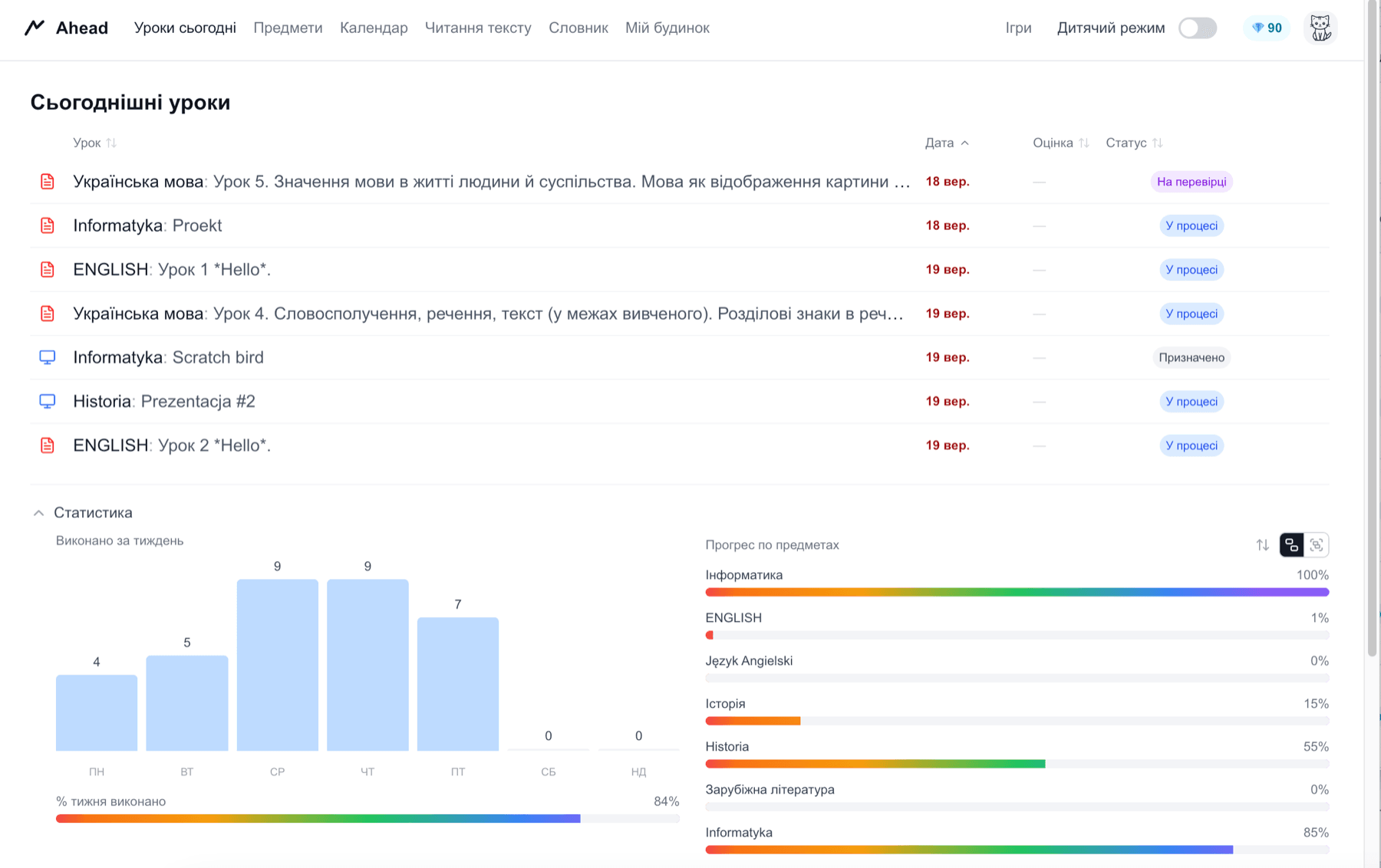
  • "Today's lessons" is a table with date, grade and status (Assigned, In progress, Under review, Done).
  • Statistics: how many lessons were done this week and what percentage of each subject is completed.
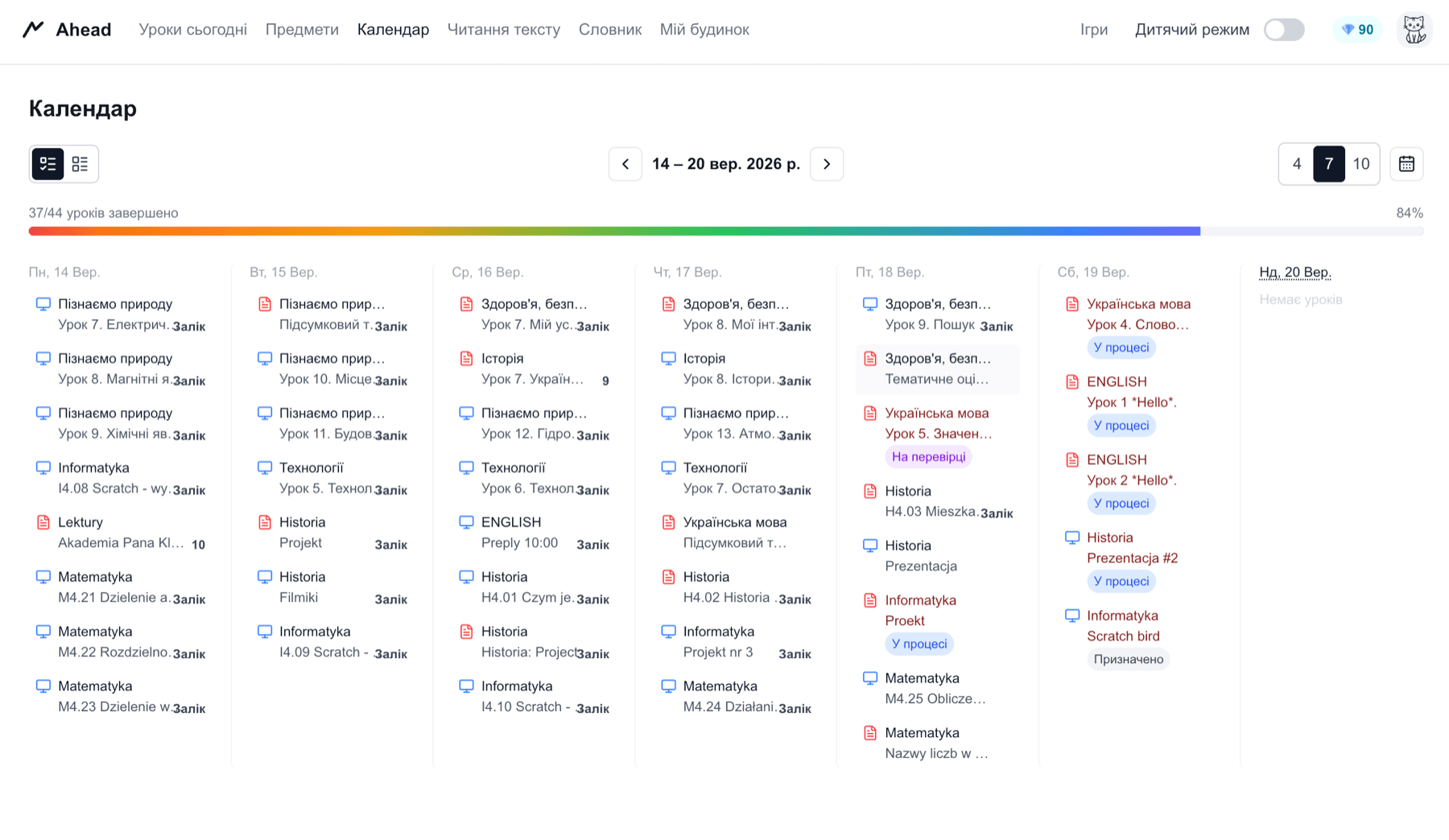
  • A 4, 7 or 10-day calendar with a progress bar.
  • A lesson with tabs: Theory, Reading, Quiz or Task, Comments.
  • The quiz is checked instantly. Tasks with files are reviewed by the tutor, who gives a grade on a 12-point scale and writes feedback, or sends the work back for revision if needed.
  • Stuck? Press "Need help": the tutor will see the question and answer in the comments.
  • Read along, Dictionary, study cards and "My house" are at hand in the top menu.
Screenshot: the list of today's lessons, bars of work done this week and progress bars by subject
Today's lessons, weekly statistics and progress by subject
Screenshot: a weekly calendar with lists of lessons by day and a progress bar of 37 of 44 lessons
Weekly calendar: all lessons and completion progress

Educational games for preschoolers

Nine mini-games about reading, counting and languages. You can play without signing in; if the child is signed in, they earn diamonds for success.

What is open without signing in

The subjects and games a guest sees are the kids mode for kindergarten middle and older groups. School mode opens after signing in; it is shown in the screenshots above.

For tutors

A tutor runs their classes and subjects: schedules lessons by date, sees each student's progress and calendar, reviews work, gives grades, leaves feedback and answers requests for help. If a child reports that something is wrong with a lesson, the tutor sees it on their dashboard right away.

Start learning today

Sign in with Google — and lessons, the calendar, diamonds and your own avatar open up.